Getting Started
Welcome to this Tutorial section, you will learn how to use the GX library by practicing, so we'll present to you a very nice example of how to use GX in a React application.
Presentation
Through this Tutorial, we'll learn how to setup a global state for a Counter Application.
Objectives
- Create a global state whose all the components of the app will access to.
- Define two actions like
incrementanddecrementfor incrementing the counter value to 1 and decrementing it to 1 respectively. - Put the state inside a store to make it available from anywhere.
- Access to both state and actions via two predefined hooks such as
useSignalanduseAction.
Pre-requisites
We assume that you have already created a new React application by using create-react-app CLI or Vite CLI.
We recommend you to use Vite CLI because it's faster than create-react-app CLI.
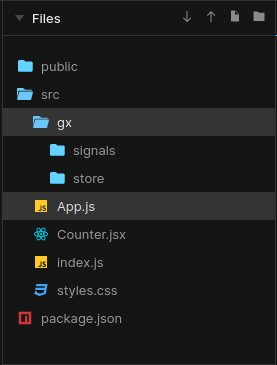
After that, you have to create a new folder (gx folder) inside the src folder.
Then, inside the gx folder, create two new folders and name them as signals and store which will contains respectively signals and the store.
The final result which looks like the image below.
Ready ? Let's get started by creating a signal